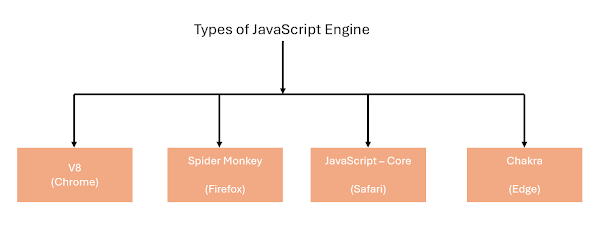
The JavaScript is a Programming language that is used for converting static web pages to interactive and dynamic web pages.
A JavaScript engine is a program present in web browsers that executes JavaScript code.
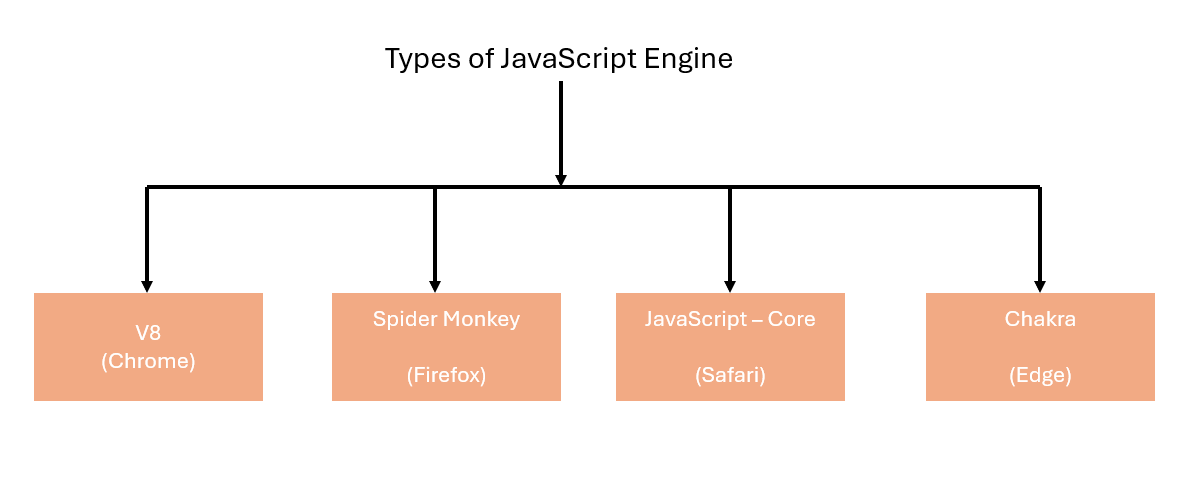

The JavaScript is a Programming language that is used for converting static web pages to interactive and dynamic web pages.
A JavaScript engine is a program present in web browsers that executes JavaScript code.
In C#, IEnumerable and IQueryable are both interfaces that represent collections of data, but they have different characteristics and are used in different scenarios.
- IEnumerable<T> is the simplest form of collection interface in C#. It represents a forward-only cursor of elements.
- It is the most basic type for iterating over a collection of objects.
- It resides in the System.Collections namespace.
- It supports LINQ operations, but they are performed locally (in-memory). That means if you perform LINQ operations on an IEnumerable, all the data will be loaded into memory first, and then the query will be executed on that in-memory data.
- Generally used for querying data from in-memory collections like arrays, lists, or other IEnumerable implementations.
// IEnumerable example
IEnumerable<int> numbers = new List<int> { 1, 2, 3, 4, 5 };
var result = numbers.Where(x => x > 2).ToList(); // LINQ query executed in memory
IQueryable:
- IQueryable<T> inherits from IEnumerable<T> but extends its capabilities by adding support for querying data from various data sources like databases (via LINQ to SQL, Entity Framework, etc.).
- It resides in the System.Linq namespace.
- It represents a query that can be executed on a specific data source.
- It allows for deferred execution, meaning the query is not executed until the result is actually enumerated.
- Queries written against IQueryable are translated into the native query language of the underlying data source (e.g., SQL for a relational database) and executed on the server-side, which can lead to better performance by only fetching the necessary data.
- Used for querying data from external data sources where the data may not reside entirely in memory.
Example:-
// Create a list of customer objects
List<Customer> customersList = new List<Customer>
{
new Customer { Id = 1, Name = "Alice", Age = 25 },
new Customer { Id = 2, Name = "Bob", Age = 30 },
new Customer { Id = 3, Name = "Charlie", Age = 18 },
};
// Create an IQueryable collection from the list
IQueryable<Customer> customersQuery = customersList.AsQueryable();
// Perform a LINQ query on the IQueryable collection
var result = customersQuery.Where(c => c.Age > 18).ToList();
<!DOCTYPE html>
<html xmlns="http://www.w3.org/1999/xhtml">
<head runat="server">
<title></title>
<style>
#container {
min-width: 310px;
max-width: 800px;
margin: 0 auto
}
td {
padding: 1rem;
background: blue;
text-align: center;
color: #fff;
}
</style>
</head>
<body>
<form id="form1" runat="server">
<div>
<script src="https://ajax.googleapis.com/ajax/libs/jquery/3.5.1/jquery.min.js"></script>
<script src="https://cdnjs.cloudflare.com/ajax/libs/html2canvas/1.4.1/html2canvas.min.js" integrity="sha512-BNaRQnYJYiPSqHHDb58B0yaPfCu+Wgds8Gp/gU33kqBtgNS4tSPHuGibyoeqMV/TJlSKda6FXzoEyYGjTe+vXA==" crossorigin="anonymous" referrerpolicy="no-referrer"></script>
<script src="https://cdnjs.cloudflare.com/ajax/libs/apexcharts/3.35.5/apexcharts.min.js" integrity="sha512-K5BohS7O5E+S/W8Vjx4TIfTZfxe9qFoRXlOXEAWJD7MmOXhvsSl2hJihqc0O8tlIfcjrIkQXiBjixV8jgon9Uw==" crossorigin="anonymous" referrerpolicy="no-referrer"></script>
<span onclick="DownloadChart()" style="background: #ffd800; padding: 1rem; color: #fff; cursor: pointer;">Download</span>
<div id="container">
<table style="width: 100%;">
<tr>
<td>3</td>
<td>4</td>
<td>6</td>
<td>5</td>
<td>8</td>
</tr>
</table>
<h2 style="text-align: center; background: #ffd800; padding: 2rem; margin-bottom: 1rem;">This is apexchart download as image using html2canvas library!!</h2>
<div id="chart"></div>
</div>
</div>
</form>
<script>
var options = {
series: [{
name: 'PRODUCT A',
data: [44, 55, 41, 67, 22, 43]
}, {
name: 'PRODUCT B',
data: [13, 23, 20, 8, 13, 27]
}, {
name: 'PRODUCT C',
data: [11, 17, 15, 15, 21, 14]
}, {
name: 'PRODUCT D',
data: [21, 7, 25, 13, 22, 8]
}],
chart: {
type: 'bar',
height: 350,
stacked: true,
toolbar: {
show: true
},
zoom: {
enabled: true
}
},
responsive: [{
breakpoint: 480,
options: {
legend: {
position: 'bottom',
offsetX: -10,
offsetY: 0
}
}
}],
plotOptions: {
bar: {
horizontal: false,
borderRadius: 10
},
},
xaxis: {
type: 'datetime',
categories: ['01/01/2011 GMT', '01/02/2011 GMT', '01/03/2011 GMT', '01/04/2011 GMT',
'01/05/2011 GMT', '01/06/2011 GMT'
],
},
legend: {
position: 'right',
offsetY: 40
},
fill: {
opacity: 1
}
};
var chart = new ApexCharts(document.querySelector("#chart"), options);
chart.render();
function DownloadChart() {
alert("Download chart !");
setTimeout(function () {
generateCanvas();
}, 1000);
}
function generateCanvas() {
html2canvas(document.querySelector("#container")).then(canvas => {
var imgData = canvas.toDataURL("image/jpeg", 1.0);
//$("#canvas_container").attr("src", imgData);
var a = document.createElement("a"); //Create <a>
a.href = imgData; //Image Base64 Goes here
a.download = "Image.png"; //File name Here
a.click(); //Downloaded file
});
}
</script>
</body>
</html>

In this article we are going to see how to retrieve unique records from the data table without using the distinct keyword in microsoft sql server.
We can get the unique records from table without using distinct keyword by the following ways:-


The Data manipulation Lanaguage (DML) basically is the manipulation of the data. In the DML there are the following operation we can perform.
The object oriented programming help us to thing in real world objects. with the help of object oriented programming we are able to create more flexible and understandable any system. by using the object oriented programming we will create the relationship between two or more things.
using System;

public class Program
{
    public static void Main()
    {
Console.WriteLine("Hello World");
}
}
public class Patient
{
public string name { get; set; }
public string address { get; set; }
public Doctor doctorwhowilltreat { get; set; }
}
public class Doctor
{
public string name { get; set; }
}
In the hospital management system we have class Patient and Doctor, in the patient class we have used the doctor class to build a relationship between Patient & Doctor.
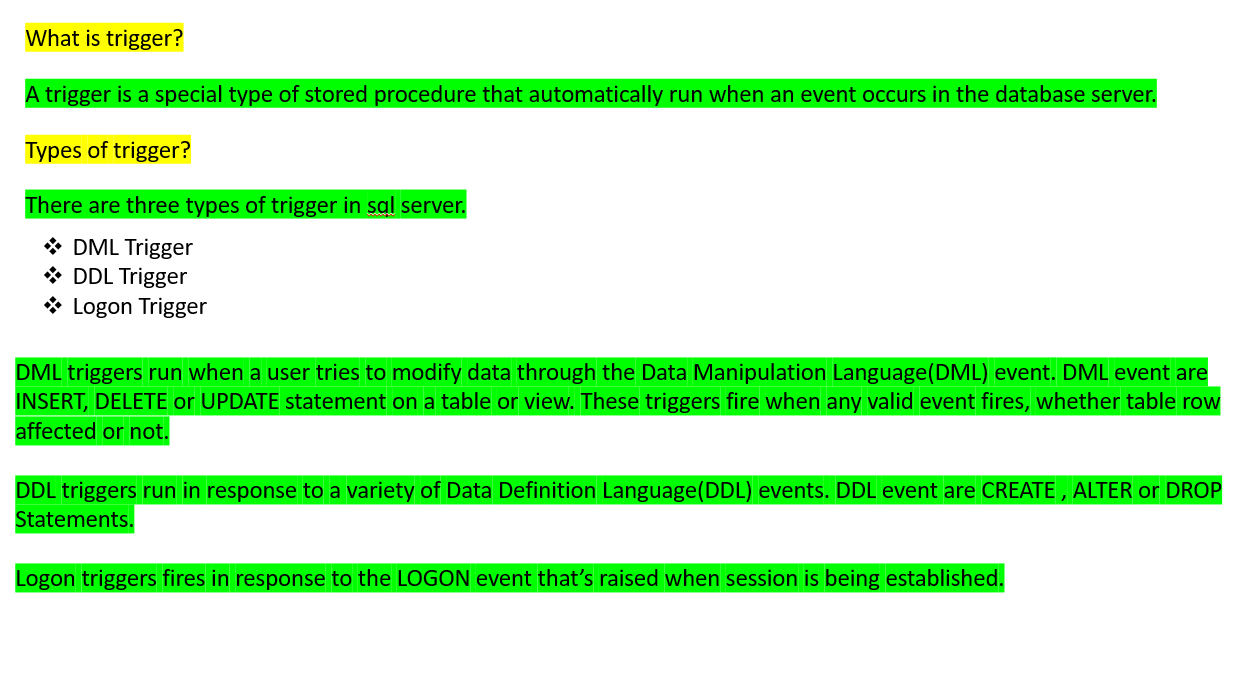
A trigger is a special type of stored procedure that automatically run when an event occurs in the database server.
Types of Triggers:-
There are three types of triggers in sql server.
In this article i will explain what is access modifiers, types of access modifiers and use of the access modifiers in c# program.
The C# access modifiers defines the scope of the classes and member of class. All types and type member have an accessibility label.
In this article i will explain what is private constructor and what is the use of private constructor.
When a constructor is created with a private specifier, it is not possible for other classes to derive from this class, neither is it possible to create an instance of this class. They are usually used in classes that contain static members only.
Some key points of a private constructor are:
using System;
public class Program
{
public static void Main()
{ // If you uncomment the following statement, it will generate
// an error because the constructor is inaccessible:
// Counter aCounter = new Counter(); // Error
        Counter.currentCount=100;
        Console.WriteLine("Counter before increment {0}",Counter.currentCount);
        Counter.IncrementCount();
        Console.WriteLine("Counter after increment {0}",Counter.currentCount);
    }
}
public class Counter
{
    private Counter() { }

    public static int currentCount;

    public static int IncrementCount()
    {
        return ++currentCount;
    }
}
Output : Counter before increment 100
Counter after increment 101 When we use private constructor:
In this article i will explain what static constructor in c# and what is use of the static constructor in c#.
The static constructor creating by use of the static keyword in c# class. static constructor invoked only once for all of the instances of the class and it is invoked during the creation of first instance of the class or the first reference to the static member in the class. A static constructor is used to initialize static fields of the class and to write the code that needs to be executed only once.
Key points of the static constructor :
The following example is the use static constructor:
using System;

public class Program
{
    public static void Main()
    {
        Circle c1=new Circle(5);
        Console.WriteLine("Area of circle is {0}",c1.CalculateArea());
    }
}
public class Circle
    {
        static float _PI;
        int _Radius;
        static Circle()
        {
            Circle._PI = 3.14f;
        }
        public Circle(int radius)
        {
            this._Radius = radius;
        }
        public float CalculateArea()
        {
            return Circle._PI * this._Radius * this._Radius;
        }
    }
Output : Area of circle is 78.5 The constructor which creates an object by coping variable from another object is called copy constructor. the purpose of copy constructor is to initialize a new instance to values of existing instance.
The copy constructor is invoked by instantiating an object of type employee and bypassing it the object to be copied
using System;
public class Program
{
    public static void Main()
    {
        Employee emp=new Employee(101,"Aman");

        Employee copyEmp=new Employee(emp);
        Console.WriteLine("Id of Employee {0}",copyEmp.Id);
        Console.WriteLine("Name of Employee {0}",copyEmp.name);
    }
}
public class Employee{
    public int Id;
    public string name;
    public Employee(int id,string empName){ //Instance constructor
        this.Id=id;
        this.name=empName;
    }
    public Employee(Employee emp){ //Declaring copy constructor
        this.Id=emp.Id;
        this.name=emp.name;
    }

}
Output : Id of Employee 101
Name of Employee Aman In the class constructor contain at least one parameter is called parameterized constructor. The advantage of the parameterized constructor is that we can initialize each instance with different values at the time of object creation of the class.
Following is the example of the parameterized constructor:
using System;

public class Program
{
    public static void Main()
    {
        Employee emp=new Employee(101,"Aman");
        Console.WriteLine("Id of Employee {0}",emp.Id);
        Console.WriteLine("Name of Employee {0}",emp.name);
    }
}
public class Employee{
    public int Id;
    public string name;
    public Employee(int id,string empName){
        this.Id=id;
        this.name=empName;
    }
}
Output : Id of Employee 101
Name of Employee Aman
In this article i will explain what is default constructor of class in c#.
The constructor of the class which do dot have any parameter is called default constructor. In other word this type of constructor does not takes parameters. The disadvantage of default constructor is that every instance of the class will be initialized as the same values of class variables. So we can not initialized each instance of the class with different values.
The default constructor initializes :
using System;

public class Program
{
    public static void Main()
    {
        Lab1 l=new Lab1();
        Console.WriteLine("Value of a {0}",l.a);
        Console.WriteLine("Value of name {0}",l.name);
    }
}
public class Lab1{
    public int a;
    public string name;
    public Lab1(){
        a=10;
        name="Brij";
    }
}
Output : Value of a 10
Value of name Brij In this article I will explain what is constructor in class, use of constructor and types of constructor.
The constructor basically special method of class that is automatically invoked when instance of class is created is called the constructor. The use of the constructor are initialize the private filed of the class while creating the instance of the class. when you have not created the constructor of the class, the compiler automatically create the default constructor. The default constructor initialize the all numeric filed to zero and all string filed to null.
using System;
public class Program
{
public static void Main()
{
Lab1 l=new Lab1();
Console.WriteLine("Value of a {0}",l.a);
Console.WriteLine("Value of name {0}",l.name);
}
}
public class Lab1{
public int a;
public string name;
}
Output :
Value of a 0
Value of name null
In the above example when we have create the instance of the class then automatically constructor are created and initialize the value of a is 0 and name is null.
Some important information about the constructor :
Types of constructor :

using System;
public class Program
{
public static void Main()
{
for(var i=0;i<5;i++){
for(var k=1;k<(5-i);k++){
Console.Write(" ");
}
for(var k=0;k<(2*i+1);k++){
Console.Write("*");
}
Console.WriteLine("");
}
}
}
}
The JavaScript is a Programming language that is used for converting static web pages to interactive and dynamic web pages. A JavaScript e...